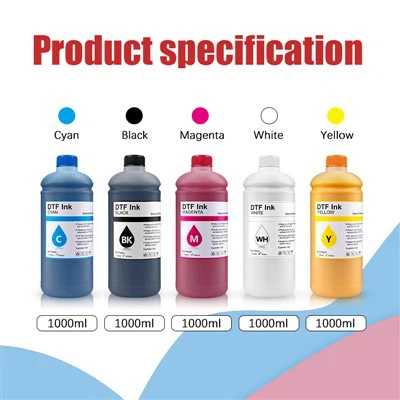
In the dynamic world of digital printing, the Epson L1800 DTF printer has become a game-changer for businesses and enthusiasts alike. Offering high-quality prints with vibrant colors, this printer is a top choice for direct-to-film (DTF) printing. However, one common issue that users often encounter is ink leakage. As a trusted supplier of ink for the Epson L1800 DTF printer, I'm here to share some expert tips on how to prevent ink leakage and ensure a smooth printing experience.
Understanding the Causes of Ink Leakage
Before diving into prevention methods, it's crucial to understand what causes ink leakage in the Epson L1800 DTF printer. There are several factors that can contribute to this issue:


- Improper Installation: Incorrectly installing the ink cartridges or refilling kits can lead to ink leakage. If the cartridges are not seated properly, ink can seep out from the connections.
- Overfilling: Filling the ink cartridges beyond their recommended capacity can cause pressure build-up, leading to ink leakage.
- Damaged Cartridges or Components: Wear and tear over time can cause damage to the ink cartridges, print heads, or tubing. Damaged components are more likely to leak ink.
- Environmental Factors: High temperatures and humidity can affect the viscosity of the ink, making it more likely to leak. Additionally, sudden changes in temperature can cause the ink to expand and contract, leading to leakage.
Prevention Methods
Proper Installation
When installing new ink cartridges or refilling kits, it's essential to follow the manufacturer's instructions carefully. Here are some general tips:
- Clean the Contact Points: Before installing the cartridges, gently wipe the contact points on the cartridges and the printer with a clean, dry cloth. This ensures a proper connection and reduces the risk of ink leakage.
- Align the Cartridges Correctly: Make sure the cartridges are aligned correctly with the printer's cartridge slots. Insert them gently until they click into place. Avoid forcing the cartridges, as this can damage the printer or the cartridges themselves.
- Check for Leaks After Installation: After installing the cartridges, check for any signs of ink leakage around the cartridge connections. If you notice any leaks, remove the cartridges and reinstall them properly.
Avoid Overfilling
Overfilling the ink cartridges is a common cause of ink leakage. To prevent this, follow these tips:
- Follow the Recommended Fill Levels: Each ink cartridge has a recommended fill level. Do not exceed this level when refilling the cartridges. You can usually find the recommended fill level marked on the cartridge or in the printer's user manual.
- Use a Measuring Device: When refilling the cartridges, use a measuring device such as a syringe or a dropper to ensure accurate filling. This helps prevent overfilling and reduces the risk of ink leakage.
Regular Maintenance
Regular maintenance is essential to keep your Epson L1800 DTF printer in good working condition and prevent ink leakage. Here are some maintenance tips:
- Clean the Print Heads: Over time, ink can build up on the print heads, causing blockages and leakage. To clean the print heads, use a cleaning solution recommended by the printer manufacturer. Follow the instructions carefully to ensure proper cleaning.
- Check the Tubing: Inspect the tubing that connects the ink cartridges to the print heads regularly. Look for any signs of damage, such as cracks or leaks. If you notice any damage, replace the tubing immediately.
- Keep the Printer Clean: Dust and debris can accumulate inside the printer, affecting its performance and increasing the risk of ink leakage. Regularly clean the printer using a soft, dry cloth to remove any dust or debris.
Environmental Considerations
The environment in which you use your printer can also affect the risk of ink leakage. Here are some environmental considerations:
- Temperature and Humidity: Keep the printer in a stable environment with a temperature range of 20-25°C (68-77°F) and a humidity range of 40-60%. Avoid exposing the printer to extreme temperatures or humidity, as this can affect the viscosity of the ink and increase the risk of leakage.
- Ventilation: Ensure that the printer has adequate ventilation to prevent the build-up of heat and humidity inside the printer. This helps keep the ink at the right viscosity and reduces the risk of leakage.
Choosing the Right Ink
Using high-quality ink is essential to prevent ink leakage and ensure optimal print quality. As a supplier of ink for the Epson L1800 DTF printer, I recommend Ocbestjet DTF Ink For Epson L1800 i3200 4720. This ink is specifically formulated for DTF printing and is designed to work seamlessly with the Epson L1800 printer. It offers vibrant colors, excellent adhesion, and long-lasting prints. Additionally, our ink is tested rigorously to ensure that it meets the highest quality standards and is free from impurities that can cause ink leakage.
Troubleshooting Ink Leakage
Despite taking all the necessary precautions, you may still encounter ink leakage issues from time to time. Here are some troubleshooting tips:
- Stop Printing Immediately: If you notice ink leakage during printing, stop the printer immediately to prevent further damage.
- Remove the Cartridges: Carefully remove the ink cartridges from the printer. Check for any signs of damage or overfilling. If the cartridges are damaged, replace them with new ones.
- Clean the Printer: Use a clean, dry cloth to wipe away any spilled ink from the printer. Be careful not to spread the ink further. If the ink has seeped into the printer's internal components, you may need to contact a professional printer technician for assistance.
- Check the Print Heads: Inspect the print heads for any signs of blockages or damage. If the print heads are blocked, you can try cleaning them using a cleaning solution recommended by the printer manufacturer.
Conclusion
Ink leakage can be a frustrating issue for Epson L1800 DTF printer users. However, by following the tips outlined in this blog post, you can prevent ink leakage and ensure a smooth printing experience. Remember to install the cartridges correctly, avoid overfilling, perform regular maintenance, and choose high-quality ink. If you encounter any ink leakage issues, follow the troubleshooting tips provided to resolve the problem.
As a leading supplier of ink for the Epson L1800 DTF printer, we are committed to providing our customers with the highest quality ink and excellent customer service. Our Printer Ink | Inkjet Ink |Ink Usage in Inkjet Printers For Epson,canon,HP,brother and Dtf Direct-to-film Ink For Inkjet Printer are designed to meet the needs of professional printers and enthusiasts alike. If you have any questions or would like to learn more about our products, please don't hesitate to contact us for a procurement discussion. We look forward to serving you and helping you achieve the best possible printing results.
References
- Epson L1800 DTF Printer User Manual
- Industry standards and best practices for inkjet printing