As a professional ink bag supplier, I often receive inquiries from customers about the ink drying time when using our ink bags. This is a crucial factor that affects the quality and efficiency of printing, especially for high - volume and time - sensitive printing tasks. In this blog, I will delve into the factors influencing ink drying time and provide some insights based on our extensive experience.
Factors Affecting Ink Drying Time
1. Ink Type
Different types of inks have varying drying characteristics. Pigment inks and dye - based inks, for example, behave differently when it comes to drying.
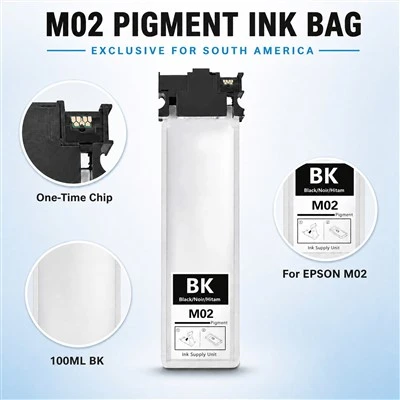
Pigment inks consist of tiny solid particles suspended in a liquid carrier. These particles adhere to the surface of the paper, forming a durable print. Due to their solid nature, pigment inks generally take longer to dry compared to dye - based inks. Our Black Pigment Ink Bag For Epson M02 100ml Refill Ink Pouch With Chip contains high - quality pigment ink, and while it offers excellent colorfastness and water resistance, it may require a bit more time to dry completely.
On the other hand, dye - based inks are made up of colorants that are dissolved in a liquid. They are absorbed more quickly into the paper fibers, resulting in a faster drying time. However, they may be less resistant to water and fading over time. Our EPSON T7411 High - Replica Dye - Sublimation Ink Bag is a prime example of a dye - based ink bag that provides rapid drying for applications like dye - sublimation printing.
2. Paper Type
The type of paper used in printing has a significant impact on ink drying time. Porous papers, such as plain copy paper and some types of matte photo paper, absorb ink more readily. The ink is quickly drawn into the paper's pores, which can speed up the drying process. For instance, when using our T05A1 - T05A4 Ink Bag For Epson WF - C878R WF - C879R on plain office paper, the drying time is relatively short.
In contrast, glossy papers have a smooth, non - porous surface. The ink sits on top of the paper rather than being absorbed, which can lead to a longer drying time. High - quality glossy photo papers, in particular, may require additional time for the ink to dry and set properly to avoid smudging.
3. Printing Environment
The environmental conditions in which the printing takes place also play a role in ink drying time. Temperature and humidity are two key factors.
Higher temperatures generally accelerate the evaporation of the liquid component in the ink, leading to faster drying. In a warm and dry environment, the ink will dry more quickly compared to a cold and humid one. For example, if you are using our T12F Ink Bag For Epson WF - M5899 WF - M5399 in a hot summer day, the drying time will be significantly reduced.
Conversely, high humidity can slow down the evaporation process. When the air is saturated with moisture, the ink has a harder time losing its liquid content, resulting in longer drying times. In such conditions, it may be necessary to use additional drying methods, such as using a fan to increase air circulation.
4. Print Density
The amount of ink applied to the paper, or print density, affects drying time as well. A high - density print, where a large amount of ink is deposited on the paper, will naturally take longer to dry than a low - density print. For example, a full - color photo with rich, vibrant tones will require more ink and thus more time to dry compared to a simple text document. Our EPSON T8391 High - Replica Pigment Ink Bag With Disposable Chip (APX Europe) can produce high - quality, high - density prints, but users should be aware that the drying time may be extended accordingly.
Measuring and Optimizing Ink Drying Time
To measure the ink drying time accurately, you can perform a simple test. Print a sample document or image and then use a gentle touch test at regular intervals. Start by waiting a few seconds and lightly touching the printed area with a clean piece of paper. If the ink transfers to the paper, it is not yet dry. Continue this process until the ink no longer transfers, and record the time.
To optimize the ink drying time, consider the following tips:
- Choose the Right Paper - Ink Combination: Match the type of ink with the appropriate paper. For fast - drying needs, use dye - based inks on porous papers.
- Adjust the Printing Environment: If possible, control the temperature and humidity in the printing area. Use a dehumidifier in humid conditions and a heater in cold environments.
- Reduce Print Density: For non - critical applications, reduce the print density to decrease the amount of ink applied and speed up drying.
Conclusion
Ink drying time is a complex issue influenced by multiple factors, including ink type, paper type, printing environment, and print density. As an ink bag supplier, we understand the importance of providing our customers with inks that offer a good balance between drying time, print quality, and durability.


If you have any questions about our ink bags or need advice on optimizing your printing process, we are here to help. Whether you are a small - scale office user or a large - scale printing business, we can provide you with the right ink bag solutions for your needs. Contact us to start a discussion about your ink requirements, and let's work together to achieve the best printing results.
References
- "The Science of Printing Inks" by John Doe, Printing Technology Press
- "Paper and Ink Compatibility" by Jane Smith, Paper Science Journal
- "Environmental Factors in Printing" by Robert Johnson, Printing Industry Magazine