




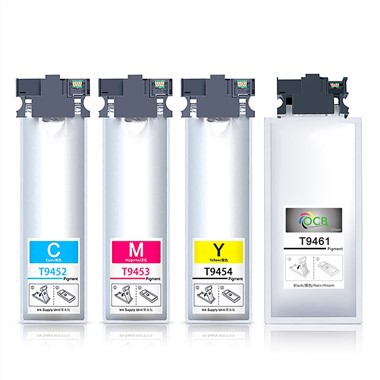
T8781 Ink Bag
Price:$26-29/PC--C M Y - 425.7ML
✅ National High-tech Enterprise Certification
✅ Certified by ISO9001 Quality Management System and ISO14001 Environmental Management System
✅ Products comply with RoHS environmental standards and CE safety certification
✅ Awarded titles such as "Top Ten Brands in China's Printing Consumables Industry," "Excellent Supplier," and "Green Environmental Protection Demonstration Enterprise"
✅ Possesses multiple independent patents and software copyrights, with industry-leading technological achievements facebook sharing buttontwitter sharing buttonlinkedin sharing buttonpinterest sharing buttonvk sharing button
Specification
|
Model |
OEM Model |
Color |
Ink Type |
Ink Volume |
Suit For Printers |
|
E-8781 |
T8781 C13T878140 |
Black |
Pigment |
1206.2ML |
Workforce Pro WF-R5190DTW/ WF-R5190 DW BAM/WF-R5690 DTWF/ WF-R5690 DTWF BAM/WF-R5690DTWFL/ WF-R5690DTWF
|
|
E-8782 |
T8782 C13T878240 |
Cyan |
425.7ML |
||
|
E-8783 |
T8783 C13T878340 |
Magenta |
425.7ML |
||
|
E-8784 |
T8784 C13T878440 |
Yellow |
425.7ML |
Product Advantage:
1. The Color Printing Is Bright And Matches Well With The Primary Color;
2. Ink: Solid Color, Almost The Same As The Original, Not Easy To Fade, Easy To Save The File.
3. Chip: 100% Compatible, If You Upgrade In The Future, We Can Help You Upgrade For Free.
4. Yield Page: Sufficient Ink Volume To Ensure That The Yield Page Is The Same As The Original.
5. Easy To Operate: Our Ink Cartridges Include Instruction Manual, Which Is Very Convenient To Install.
6. High Compatibility, Serious Clogging Of The Printer Head
Effect show:


How To Replace It?
Make Sure You Have Your Replacement Ink Packs Handy Before You Begin. You Must Install New Ink Packssimmediately After Removing The Old Ones.
1. If An Ink Pack Is Low Or Expended, You See A Message On Your Product's Lcd Screen And On Your Computer Screen. Note Which Ink Packs Need To Be Replaced.
2. Unlock And Open The Front Cover.
3. Press The Ink Pack Tray Until It Clicks And Pull It Out.
4. Remove The Used Ink Pack From The Tray.
Note: Dispose Of Used Ink Packs Carefully.do Not Take The Used Ink Pack Apart Or Try To Refill It.
Warning: If Ink Gets On Your Skin, Wash It Thoroughly With Soap And Water. Lf Ink Gets Into Your Eyes,flush Them Immediately With Water. Seek Medical Advice If Problems Persist. Lf Ink Gets Into Yourmouth, Spit It Out And See A Doctor Right Away.keep Ink Packs Out Of The Reach Of Children.
5. Shake The New Ink Pack 10 Times And Remove It From The Packaging.
Caution: Do Not Touch The Green Chip On The Ink Pack.
6. Insert The New Ink Pack Into The Ink Pack Tray As Shown.make Sure The Top Of The Ink Pack Is Level With The Top Of The Tray.
7. Slide The Ink Pack Tray Into The Product Until It Clicks.
Note: If You Cannot Insert The Tray All The Way, Make Sure You Are Inserting The Correct Color Ink Packand That The Top Of The Ink Pack Is Level With The Top Of The Tray.the Ink Packs Can Only Be Inserted into The Proper Location.
8. Repeat These Steps For Each Ink Pack You Want To Install.
Replacing Ink Supply Units
1.Open The Ink Case.

Note:This Procedure Explains How To Replace The Black Ink Supply Unit. To Replace Color Ink Supply Units, Open The Ink Case On The Other Side Of The Printer. 'the Replacement Methods Are The Same.
2.Push The Handle On The Ink Supply Unit That You Want To Replace.The Ink Supply Unit Will Pop Out.

3.Lift Up The Ink Supply Unit.

Note:lf you cannot lift up the ink supply unit, pull the handle forward.
4.Unpack the new ink supply unit from its package.

Important:Do not touch the sections shown in the illustration. Doing so may prevent normal operation and printing.

Note:lf there is protective material attached to the bottom of the ink supply unit, remove it. 'The shape and number ofprotective materials and where they are attached are subject to change without notice.

5.Shake The Ink Supply Unit 20 Times Well.

6.Insert The Ink Supply Unit Into The Ink Case So That It Fits Into The Printer.

Note:1) If The Ink Supply Unit Has Changed Shape Due To Being Dropped And So On, Fix The Shape Before Inserting It In Theprinter; Otherwise, It May Not Be Set Correctly Or The Ink Levels May Not Be Displayed Correctly.
2) If The Ink Supply Unit Has A Base That Spreads Out, Spread The Base And Place It Over The Projecting Section In The Inkcase.some Ink Supply Units Do Not Have A Base That Can Be Spread.

7.Push The Handle Of The Ink Supply Unit Until It Clicks Into Place.

Note: If Check Is Displayed On The Control Panel, Press The Button To Check If The Ink Supply Units Are Installed Correctly.
8. Close The Ink Case.
Guarantee:
1. High Quality Assurance, 3 Qc Tests Before Leaving The Factory
2. Responsible For Thoughtful After-sales Service
3. 100% Guarantee And 1:1 Replacement
4. Competitive Price, For Larger Quantity Price, Can Consult
5. Fast Delivery
Shipping:
Express: Dhl, Fedex, Tnt, Ems, Etc., Usually For Small Parcels Delivery Time: 3-7 Days
Air Freight: More Than 45kg, You Need To Know The Airport Name To Report The Freight, Delivery Time: 7-10 Days
Sea Freight: More Than 1cbm, Need To Quote The Freight By Seaport Name, Delivery Time: More Than 30 Days.
Freight! ! !
Due To Covid-19, Shipping Rates Change Frequently, Please Contact Us For Current Shipping Rates Before Payment. Thanks.
Why choose us?
- Our Chinese factory is equipped with the latest machinery and tools to ensure smooth production and timely delivery of ink bags.
- We always think from the customer's point of view and are brave enough to accept new things and constantly improve and perfect ourselves.
- We never compromise on quality at our Chinese factory, and strive to continuously meet and exceed customer expectations.
- Our company has established a good and stable partnership with many domestic enterprises. Our company has a vigorous production and sales team.
- We prioritize quality and consistency at our Chinese ink bag factory to ensure that every product is up to our high standards.
- The main theme of our enterprise is "creating value together, sharing growth", and creating great business, creating business model together, creating future value together with our partners and sharing development opportunities, sharing growth wisdom and sharing the joy of success with our partners!
- Our Chinese factory offers premium-quality ink bags and unmatched customer service.
- Our company has been producing reliable T8781 Ink Bag for many years, and we welcome new and old customers to visit us.
- If you're looking for a Chinese factory that can provide you with affordable, high-quality ink bags, our company is the perfect choice.
- We continue to give full play to our own advantages and enhance the scale and efficiency of our enterprise.
Hot Tags: t8781 ink bag, China t8781 ink bag manufacturers, suppliers, factory, canon pixma ink cartridges, hp 8620 ink, canon mg2460 ink, hp deskjet f380 ink, hp deskjet 2131 ink, 61 black ink
You Might Also Like



Send Inquiry